
Healthy Roster
Healthy Roster, LLCMedical
3.329.00 Reviews
- Version
- 6.61.1
- Installs
- 100.00K
- Age Rating
- Everyone
Screenshots
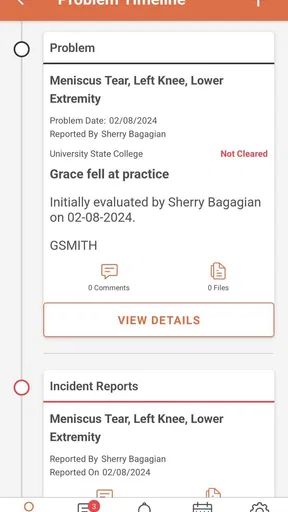
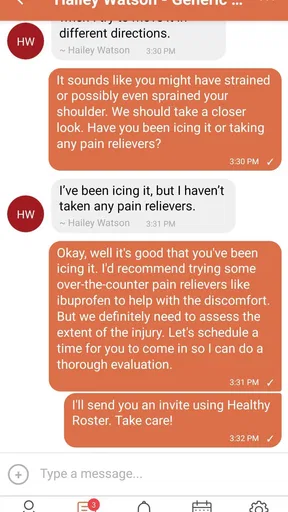
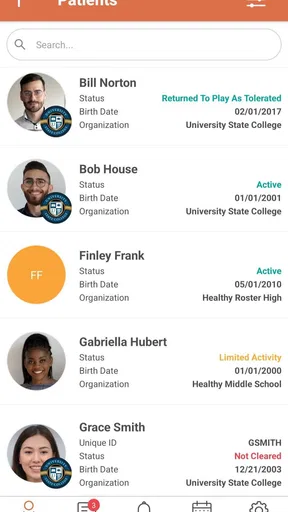
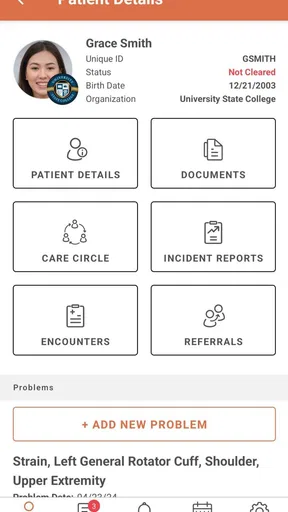
Our Review of Healthy Roster
 Analysis by Appyee
When I look at a medical app, I care about trust before convenience. Healthy Roster is aimed at a very specific professional setting: athletic trainers who need to document care and communicate while moving between practices, games, and treatment areas. I found that focus useful because the app is not trying to be a general fitness tracker or a patient-facing diagnosis tool. It is a work app built around the practical record-keeping needs of sports medicine.
My overall impression is cautious but positive. Healthy Roster, developed by Healthy Roster, LLC, can make an athletic trainer’s day more organized, especially when notes and communication would otherwise be scattered across paper, text messages, and separate office systems. At the same time, the app deserves a more careful evaluation than a typical free productivity download because medical documentation involves sensitive information. The important question is not simply whether it saves taps. It is whether the workflow gives the right people enough control over what they record, share, and retain.
Where Healthy Roster fits in an athletic trainer’s routine
The app belongs in the medical category, but its practical identity is closer to a mobile documentation and communication workspace for athletic trainers. I would picture it being used beside a field, in a school training room, or during follow-up work after an athlete leaves practice. Instead of waiting until the end of the day to reconstruct what happened, a trainer can use a phone or tablet as the place where care-related work is organized.
That distinction matters. A general notes app may be faster for writing a quick reminder, while email may be familiar for sending an update. Neither is designed around the discipline of maintaining a consistent care record. Healthy Roster’s value is therefore less about one spectacular feature and more about bringing related tasks into a professional context.
In an everyday scenario, I can imagine an athlete reporting discomfort during training. The trainer needs to capture the situation while the details are fresh, keep track of what was discussed, and communicate appropriately with the people involved. A paper notebook can work, but later transcription creates another task and another opportunity for mistakes. A consumer messaging app may be convenient, but it can blur personal and professional communication. A dedicated tool offers a more deliberate middle ground.
I would not treat it as a replacement for clinical judgment. The app can support documentation and communication, but it does not turn an athletic trainer into a diagnostician, and it should not be used as a substitute for emergency procedures or the organization’s established medical policies. That is one of the first boundaries I would explain to a new user.
Why trust is more important here than in an ordinary organizer
Healthy Roster deals with a type of work where a casual approach to information can create real problems. A trainer may handle injury details, treatment notes, contact information, or conversations involving an athlete’s care. Even when an app feels simple, the consequences of an incorrect recipient, an incomplete note, or an unclear account setting can be much greater than they would be in a shopping list application.
My advice is to judge the app by the complete workflow rather than by its store presence. Before entering real information, an organization should decide who is allowed to use it, what kind of documentation belongs there, how accounts are managed, and what the local process is for correcting or exporting records. Those decisions are not optional extras. They determine whether the mobile convenience is actually responsible.
The app has been available since October 19, 2015, and its current version is 6.61.1. That long presence can make a product feel established, but age alone is not proof of suitability for a particular clinic, school, or team. I would still ask the administrator to test the current workflow with non-sensitive sample information before rolling it out broadly.
What the public numbers suggest—and what they do not prove
Healthy Roster is free to download, has an Everyone content rating, and has passed 100K installs. Its average rating is 3.3 from 89 ratings, with 29 written reviews. I see that as a sign to keep expectations realistic rather than as a simple thumbs-up or thumbs-down. There is enough adoption to show that the concept reaches real users, but the rating is not so strong that I would recommend deploying it without a trial.
Those figures also do not answer the questions that matter most for a medical workflow. A rating cannot tell me whether a school’s account structure fits its staff, whether a particular communication routine is clear, or whether an administrator can confidently control access. I would use the numbers as a reason to investigate, not as a substitute for investigation.
Verified controls should be checked before real records are entered
The most responsible way to start is to create a small evaluation plan. I would ask the person responsible for the rollout to identify the account owner, list the intended users, and define which actions each role should perform. Then I would test the process using fictional names and harmless sample notes.
That test should answer practical questions: Can the right person sign in without sharing credentials? Is it obvious which account is active? Can a trainer review the intended recipient before sending a communication? Is there a clear way to correct a mistake? Can an administrator remove access when a staff member leaves? If the answers are unclear, the problem is not solved by telling users to “be careful.” The workflow itself needs attention.
I would also separate the app’s convenience from the organization’s retention policy. A mobile record can be easy to create and still be difficult to manage later. Before adoption, the team should agree on how long information is kept, who handles corrections, and how records are handled when an athlete changes teams or stops receiving care. Healthy Roster may support the daily work, but the organization still needs its own rules.
A useful trust test is to follow one piece of information from creation to closure. Start with a fictional injury note, send a sample update to the intended contact, review the record, and then ask what happens when the case is no longer active. This exposes more than a quick tour because it tests the full life cycle rather than only the first screen.
Permissions and visible choices deserve a deliberate review
I would not grant access automatically during setup. Instead, I would read each permission request in context and ask whether it is necessary for the task the trainer wants to perform. If a permission seems unrelated to documentation or communication, I would pause and investigate before accepting it. The safest habit is to give the app only what the device and workflow genuinely require.
Device-level controls are only one part of the picture. Account controls matter just as much. A trainer should know how to sign out, how to protect the device, and what to do if the phone is lost. A shared tablet in a training room presents a different risk from a personally assigned phone. In the shared-device case, I would create a written sign-out routine and make sure the next user cannot casually open the previous session.
Visible choices are especially important when communication involves more than one person. Before sending an update, the user should slow down long enough to verify the recipient and the content. Autocomplete and saved contacts are convenient, but convenience can also make an incorrect selection easy. My practical tip is to use a short confirmation habit: read the athlete’s name, read the recipient’s name, and then review the message for unnecessary medical detail.
I would also avoid treating a free price as permission to use the app without oversight. Free removes a purchase barrier; it does not remove the need for account administration, staff training, or a clear data-handling process. The application’s Everyone rating describes its general content suitability, not the sensitivity of the information a professional may enter into it.
Data-sensitive moments are usually small and easy to overlook
The riskiest moments are not always dramatic. They may happen when a trainer writes a note while distracted, leaves a session open, attaches the wrong detail to a conversation, or copies information into another channel for convenience. A good workflow anticipates these ordinary mistakes.
For field use, I would prepare a compact documentation routine before the season begins. Record only what is needed for the professional purpose, avoid casual speculation, and write in language another authorized person can understand later. This is more than a privacy precaution; it improves continuity when a different trainer reviews the situation.
Communication deserves its own discipline. A message should contain enough context for the recipient to act appropriately, but not every detail the sender happens to remember. I would use the app for the intended care-related exchange and resist the temptation to turn it into a general team chat. Keeping medical communication focused reduces confusion and makes later review more meaningful.
Another non-obvious trade-off is speed versus completeness. Mobile entry is valuable immediately after an event, but a hurried note can omit timing, symptoms, or follow-up instructions. My solution would be to create a short personal checklist and use it consistently. The checklist does not need to be complicated: what happened, what was observed, what action was taken, and what needs to happen next. That structure makes the app more useful without turning every entry into a long report.
How much control does the user really have?
User agency begins with knowing what the app is being used for. A trainer should not feel pressured to enter every possible detail simply because a field exists. The right amount of information depends on the care process and organizational policy. I prefer a minimum-necessary approach: document enough to support continuity and accountability, while avoiding personal details that do not serve the purpose.
There is also a difference between the individual user and the organization. A trainer may create a record, but an administrator may control the broader account environment. That means a rollout should explain who can manage users, who can review records, and who handles support questions. If nobody can answer those questions, the organization is not ready for sensitive use.
I would give staff a short practice session built around realistic but fictional cases. One person can create a note, another can review the communication flow, and an administrator can test account changes. This reveals whether the interface is understandable under pressure. It also gives staff a chance to identify confusing labels before those labels affect a real athlete.
For a small program with one trainer, the app may feel straightforward. For a larger program with rotating staff, volunteers, or multiple teams, governance becomes more important than the initial download. In that situation, I would compare Healthy Roster with a broader clinical record system if the organization needs formal role-based administration, extensive reporting, or integration with existing medical operations. A focused mobile tool may be the better fit for speed, but a larger system may be preferable when oversight and interoperability dominate.
Where it beats familiar alternatives—and where it may not
Compared with paper, Healthy Roster has the potential to reduce later transcription and make information easier to organize during a busy day. Compared with a generic notes app, it is more aligned with the professional setting. Compared with ordinary texting, it encourages a clearer separation between care communication and personal conversations.
Those advantages depend on adoption. If only one staff member uses it while everyone else continues with paper and messages, the record becomes fragmented. The app is most convincing when the whole intended workflow uses it consistently. A half-adopted system can create another place to check rather than replacing the old places.
I would choose a different option when the main need is personal symptom tracking, home exercise reminders, or general wellness. Healthy Roster is not the natural choice for someone who simply wants to count workouts or monitor daily habits. I would also look elsewhere if an organization needs a highly specialized hospital record platform, advanced analytics, or deeply defined administrative controls that the team cannot verify during its evaluation.
On the other hand, an athletic trainer who mainly needs mobile documentation and communication may find a general office suite too loose and a full hospital system too heavy. That is the space where this app makes sense: a focused tool for a focused professional routine, provided the organization is willing to establish careful rules around access and information.
Device compatibility and practical setup
The minimum operating system is Android 7.0, so compatibility should be checked against the actual phones and tablets used by the staff rather than assumed from the app’s age. A team with older devices should test installation, sign-in, and the complete documentation flow before the first live use. A device that can install an app is not automatically comfortable or reliable for repeated field entry.
I would also test the app in the places where it will really be used. A quiet office can hide problems that appear beside a noisy field or during a crowded practice. Try the workflow with gloves, limited time, and interruptions in mind. If entering a concise note takes too much attention, staff may postpone it, which weakens the very record-keeping benefit the app is meant to provide.
Before launch, I would prepare a simple internal guide covering sign-in, lost devices, mistaken messages, account changes, and escalation to the organization’s medical lead. This guide is more valuable than a generic instruction to “use the app correctly” because it gives users a response when something goes wrong.
My cautious verdict for prospective users
I see Healthy Roster as a potentially useful professional app for athletic trainers who want a more structured mobile way to document care and communicate. Its free availability and focused purpose make it easy to evaluate, and its adoption shows that it is not an obscure experiment. Still, the average rating of 3.3 means I would approach it as a trial candidate rather than an automatic recommendation.
My recommendation is strongest for a school, club, or sports program that can assign an administrator, train its staff, and test the complete information life cycle before using real records. The app can help when the alternative is scattered paper and informal messaging, especially during a busy day when timely documentation matters.
I would skip it for casual personal health tracking, and I would be cautious about choosing it for an organization that cannot define access responsibilities or respond to account and device problems. In those cases, a simpler personal tool or a more comprehensive clinical platform may be more appropriate.
In the end, I would not judge Healthy Roster by the download itself. I would judge it by whether my team can use it with restraint, verify every recipient, protect every account, and explain what happens to information after the immediate task is finished. That combination of practical usefulness and deliberate control is what makes the app worth considering. For the right athletic-training workflow, it can be a sensible mobile companion; for any setting that treats medical information casually, no app convenience is enough.
Healthy Roster is free, carries an Everyone age rating, and is available from Healthy Roster, LLC. The current version is 6.61.1, with support beginning at Android 7.0.
Verdict
Strengths of Healthy Roster
- Simple way to organize family health records in one place.
- Secure document sharing can reduce repeated paperwork.
- Useful for tracking appointments, medications, and care details.
- Helps caregivers coordinate information for children or dependents.
- Accessible from mobile devices when records are needed quickly.
Limitations of Healthy Roster
- Some features may depend on your employer or healthcare provider.
- Uploading and organizing older records can take considerable time.
- The app is less useful if your providers do not participate.
- Sensitive health data requires careful password and account management.
- Advanced care-management tools may feel unnecessary for occasional users.
Similar Picks in This Category
View All
WebMD: Symptom Checker
WebMD, LLC4.1

Microphone Amplifier
DOSA Apps4.2

Anatomy Learning - 3D Anatomy
3D Medical OU4.5

Period Tracker and Calendar
SimpleInnovation4.9

GoodRx: Prescription Coupons
GoodRx4.8

CVS Health
CVS Pharmacy4.5
Frequently Asked Questions
What is Healthy Roster and who is it designed for?
Healthy Roster is a digital platform for managing sports medicine and athlete health information. It is mainly designed for athletic trainers, schools, sports organizations, healthcare providers, coaches, parents, and athletes. Depending on the organization using it, the app may help with injury documentation, treatment notes, care coordination, injury updates, and communication between authorized members of an athlete’s support team.
Can athletes and parents use Healthy Roster without being connected to an organization?
Healthy Roster is generally intended to work through a participating school, sports program, clinic, employer, or healthcare organization rather than as a completely independent medical app. Access may require an invitation, registration code, or account created by an administrator. Before downloading, check whether your organization supports Healthy Roster and confirm which features are available to athletes, parents, coaches, and medical staff.
What kind of health information can be viewed or shared in Healthy Roster?
The information available depends on the organization’s setup and your user permissions. Healthy Roster may be used for injury reports, care updates, treatment documentation, return-to-play information, forms, messages, and other athlete-related health records. Because this can include sensitive medical information, users should review the organization’s privacy practices and only share details with authorized people through the appropriate account.
Is Healthy Roster a replacement for a doctor or emergency medical care?
No. Healthy Roster is a communication, documentation, and care-management tool, not a substitute for professional medical evaluation. Information shown in the app may support coordination with athletic trainers or healthcare providers, but it should not be used to diagnose a serious condition or delay urgent treatment. For emergencies, severe symptoms, or immediate danger, contact local emergency services or seek medical care directly.
What should I check before downloading and creating a Healthy Roster account?
Before downloading Healthy Roster, verify that your school, team, clinic, or organization uses the platform and that you have the correct invitation or login details. Check your device’s supported operating system, notification permissions, and internet access requirements. It is also worth reviewing the privacy policy, account permissions, communication settings, and whether some features are restricted to administrators or healthcare professionals.
